

Most people searching for the best computer desks under 200 dollars want one honest answer first: the desk has to hold a monitor, a keyboard and a setup without rocking every time you type. We spent weeks comparing fifteen budget desks on frame material, stated load, height and assembly, and the ErGear 48 x 24 inch electric standing desk came out on top.
That is not the only good answer. A 32 inch steel-frame desk can beat it for a dorm room, a farmhouse writing table wins for a bedroom corner, and a 53 inch L-shaped unit is the only option that survives a dual-monitor battlestation. What follows is the full list, ranked by how well each desk handles a real setup rather than by how it looks in a photo.
The reason budget desks get returned is rarely the features. It is the frame. Desks wobble because a single thin leg carries a heavy load, because a particleboard top has no crossbar under it, or because the feet have no adjustment. Those are structural choices, and the fifteen desks below differ far more on them than their LED strips suggest.
We also flag what each desk cannot do. Several of these units have no stated load rating at all, and one is rated to 49 pounds, which rules out a monitor arm and anything heavier than a laptop. Read the skip-if line before you fall in love with a listing.
Top 3 Computer Desks Under 200 Dollars in October 2026

Quick Spec Comparison of All 15 Desks (October 2026)
Every desk below clears the two-hundred-dollar cap. The table lists the four specs that decide whether a setup fits: work surface, frame, storage and any published load figure.

1. ErGear 48 x 24 Inch Electric Standing Desk – Best Overall
We picked this one because it answers the three complaints that come up most often in budget desk reviews: a desk stuck at one sitting height, a frame that shakes when you type, and a top with no steel underneath it. The lift motor moves the surface from 28.35 to 46.46 inches, so it reaches true standing elbow height without a lever or a riser.
The alloy steel frame is the reason it earns the top spot. ErGear states the frame was tested for 100,000 lift cycles, which is a durability claim almost nobody else in this price range makes. More than 12,000 reviews averaging 4.5 stars back that up, and the recurring praise is about the motor staying quiet and the frame not shaking at full height.
Four memory presets are more useful than they sound. You set your sitting height and your standing height once, then the desk returns to either with one tap instead of hunting for the right button combination every morning. That is the single feature buyers on r/StandingDesk ask for most often and the one most cheap frames skip.
Two practical notes before you commit. The 24 inch depth is fine for one monitor plus a laptop, but it is cramped for two large panels pushed back from the edge. And the stated 176 lb capacity is a rating for the whole moving assembly, so subtract the weight of your monitors, tower and anything clamped to the frame.
Buy it if you will actually change height
This desk pays off if you sit and stand through the day. If you work eight hours seated at one screen, a fixed steel desk with more surface area gives you more for the money.
It also suits small home offices where a 48 inch width leaves room to walk past. The 43.8 lb weight means two people for stairs, but it is manageable within a flat.
Skip it if you need deep desk space or built-in cable routing
Owners running two large monitors report the shallow top is the limiting factor. There is no keyboard tray and no grommet, so cables run along the floor.
Over-tightening the leg bolts is the one assembly mistake that creates a wobble here. Tighten to firm and stop rather than cranking harder.
2. Furinno Econ Multipurpose Writing Desk – Best Compact Writing Desk
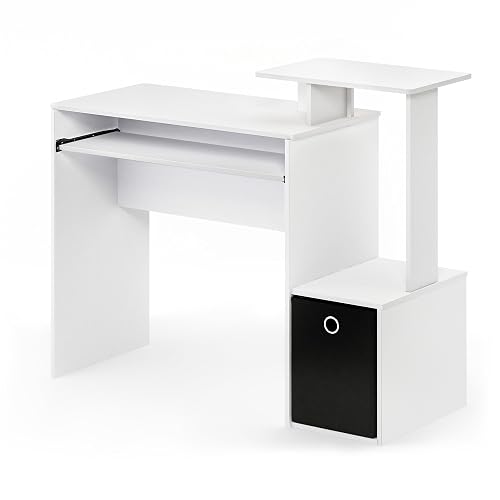
With more than 41,000 reviews, this is the most proven desk in the roundup, and it is the one most often recommended for writing rather than computing. The 39.4 inch width fits a notebook spread with room for a lamp, and the pull-out keyboard tray keeps the surface clear.
It is built from composite wood with plastic tube supports, which is where the 4.1 average comes from. Buyers consistently call it good value and quick to build, and a notable share work around the wobble by wall-mounting monitors and keeping heavy gear off the upper platform.
The 15.8 inch depth is genuinely tight, so this is not the desk for a keyboard and mouse plus a full-size desktop. Think notebook, laptop, small monitor. The two open shelves hold a printer or a stack of paper without taking drawer space.
There is no published load capacity on this listing, which is the main reason it sits at number two rather than first. For a light writing setup that is fine. For anything clamped down with bolts, choose a desk with a stated rating.
Buy it if you write and study more than you game
The keyboard tray and storage bin make this the most useful desk here for note-taking, journaling and homework. The tray alone removes the keyboard from your working area.
It is also the easiest to move between rooms at 35 pounds, so a student can take the whole setup to a shared house or a library.
Skip it if you type hard and want zero movement
Firm typists report the particle board body sways, and the elevated monitor shelf is described as precarious once loaded. Wall-mounted displays solve that but add cost.
Some owners note that a few pieces fit loosely and need glue or rework during assembly, so allow extra time if you are not handy.
3. PayLessHere 32 Inch Steel Frame Desk – Best Value

A 4.6 average across more than 8,500 reviews at the low end of this category is rare, and the reason is structural. The triangular steel frame with cross braces is the sturdiest thing here for the money, and the listing states a 220 lb weight recommendation.
The 32 inch width and 20 inch depth make this a corner desk. Owners use it in dorms, small bedrooms and as a secondary worktop next to a larger desk, and several describe buying two to form a long run.
Assembly takes about ten minutes with the included tools and labeled parts. That speed matters if you are setting up in a rented room on a Sunday, and it is well below the hour some flat-pack desks demand.
The recurring caveat is depth. At 20 inches it will not hold two monitors pushed back from the edge, and it cannot take a full-size desktop tower on the surface. It is a writing and laptop desk with a monitor, not a battlestation base.
Buy it if stability matters more than surface area
This is the desk to buy when your last one rocked. The steel frame and cross bracing are the direct answer to the wobble complaint that dominates budget desk reviews.
It suits dorm rooms, kids homework corners and a second workstation where a laptop and one monitor are the whole setup.
Skip it if you plan a dual-monitor rig
The shallow depth is the deciding factor for anyone with two panels or a wide keyboard. Buyers report slight lateral play in the frame once it is heavily loaded.
A few owners note the cross bars can loosen over time, so a quick re-tighten every few months keeps the feel consistent.
4. Huuger 55 Inch Wide Desk – Best Wide Desk

When 54 inches of width is the deciding factor, this is the desk. The surface holds a wide monitor, a laptop and a full keyboard with extra room, and the steel tube legs plus under-top reinforcement struts keep it from flexing in the middle.
Weighing 21 pounds while feeling sturdy is unusual in this category, and it means one person can carry it up a flight of stairs. The 4.5 rating across roughly 3,000 reviews reflects a straightforward, well-built fixed desk with no gimmicks.
Mind two numbers before ordering. The 19.7 inch depth is shallow for a full-size desktop tower, and the fixed 29.5 inch height sits low for anyone over six foot two. The same brand also sells larger sizes in the same line if you need more depth.
There is no drawer and no shelf, so storage is whatever you put underneath it. Pair it with a small rolling unit if you need pens and cables off the surface.
Buy it if you want maximum width for a single room
Video editors, students with a laptop and a monitor, and anyone building a study and homework station get the most from a 54 inch span at this weight.
It also works as a shared family surface, since the light frame makes it easy to reposition against a wall each evening.
Skip it if you need depth or a tall sitting height
A 19.7 inch depth is the real constraint here. Dual-monitor users with deep monitors will find their screens close to the wall.
The particleboard top is the part reviewers flag for long-term wear, so keep drinks off it and avoid clamping heavy arms into it.
5. DLisiting 32 Inch Desk With Drawers – Best Storage In A Small Footprint

This desk answers the most common small-room complaint: nowhere to put anything. Two fabric drawers and a pair of iron hooks sit inside a 31.5 inch footprint, so a bedroom or dorm room gets a work surface with built-in storage rather than a bare table.
The stability detail that matters here is the adjustable leg pads. Combined with the fixed steel brackets, they let you level the desk on carpet or an uneven floor, which is where a lot of budget wobble complaints begin.
Assembly takes 20 to 30 minutes with the included manual and tool. The waterproof, scratch-resistant surface on the P2 particle board is easier to live with than raw board, though it will still show wear sooner than solid wood.
At 16.3 pounds this is among the lightest desks here, so moving it between a bedroom and a living room costs nothing in effort. Just note the 17.7 inch depth is the tightest on the list.
Buy it if storage matters in a tight room
Students, renters and anyone sharing a room get more use from built-in drawers than from a wider surface. Cables, chargers, notebooks and stationery all fit the two drawers.
The hooks are useful for a headset or a bag, and they cost nothing to add later if you need more.
Skip it if you keep anything heavy in a drawer
Fabric drawers are for pens and paper, not for hardware or a stack of hardback books. Owners report them flattening under heavy items.
The particle board top is also the first thing to wear on this desk, so treat it as a light-duty surface.
6. Veken 55 Inch Electric Standing Desk – Best Standing Desk For Large Setups

The Veken solves the problem that rules out most budget standing desks: not enough width. At 55 inches it holds multiple monitors and a full keyboard, and it lifts from 28.3 to 46.5 inches through a motor rated under 52 dB, quiet enough for an apartment.
It also publishes a two-year warranty, which is the signal experienced buyers on r/StandingDesk treat as the honest measure of quality. A one-year electronics warranty is treated there as a warning sign, so this one stands apart.
Built-in cable management is the sleeper feature. Most desks in this list leave you routing cords down a leg and across the floor, while this one gives you channels and clips to keep them attached to the frame as it moves.
Headphone hooks, foot pads and a manual are included, and assembly takes 10 to 30 minutes. The stated 154 lb capacity is lower than the ErGear frame, so subtract your full setup weight before clamping anything.
Buy it if your setup needs width and height changes
Two-monitor users, streamers and anyone moving between a seated drafting position and standing work get the combination they cannot find under the cap elsewhere.
The two-year warranty also means a replacement path if the motor fails, which matters more than the LED strips competitors push.
Skip it if you move rooms often
At 42 pounds it is awkward to reposition once assembled, so plan the final spot before you build it. Reviewers also note the two-board desktop shows a seam down the middle.
Stability varies a little with floor type, so flat level flooring suits it better than thick carpet.
7. Lufeiya 47 Inch Desk With File Drawers – Best For Filing Papers

If you still work with paper, this is the one. The third drawer is a genuine hanging-file drawer that takes legal or letter size folders, and it installs on either side so the layout matches your room rather than the photo.
At 47 inches it is wide enough for a monitor and a scanner or a second screen, and owners note the leg room works with a chair raised to full height, which is unusual at this size.
The top is FSC-certified wood on a black powder-coated metal frame, and extra steel brackets plus adjustable leg pads keep it steady on uneven floors. Assembly takes about 20 minutes with clearly numbered, well-packed parts.
Be realistic about the drawers though. They are fabric over cardboard, which handles stationery and hanging files well and sags under anything dense. Owners also report the handle paint arriving chipped on some units.
Buy it if paperwork is part of your day
Administrators, students and anyone running a home business get a real filing system inside a desk footprint, not a plastic tower beside one.
The reversible file drawer is the detail that makes it adaptable to a corner you cannot rearrange.
Skip it if you need a flat, flawless worktop
The desktop is two separate boards and owners report slight warping, enough for a pen to catch in a seam. Plan on a desk mat if you write by hand.
Some buyers also find the leg slots too tight during assembly, and the two leg sets are similar enough to mix up.
8. Pamray 32 Inch Desk For Bedrooms And Kids Rooms – Best For Kids Rooms

This is the desk we would put in a child bedroom. The 31.5 inch surface gives a student room to open a textbook and write, the fixed steel brackets and adjustable leg pads hold it steady while a child leans on it, and the whole unit is light enough to move between rooms.
The 150 lb weight recommendation is a real published figure, which is more than many small desks in this roundup offer. Buyers single out the clean hardware alignment and the absence of missing parts.
Each fabric drawer is rated to 10 pounds, so they are built for pencils, paper and stationery rather than books or a laptop plus charger both at once. Installation instructions, tools and video guides are in the box.
Adults consistently find it tighter than they expected. That is not a flaw, it is the size, but a 6 foot tall user will want the wider 47 inch options instead.
Buy it if the desk is for homework or a small bedroom
Kids rooms, guest rooms and studio apartments are where this desk earns its keep. Six color options make it easy to match an existing room.
It is also the fastest build on the list at 15 to 20 minutes, which helps if a child needs somewhere to do homework this weekend.
Skip it if an adult will work there daily
Adults describe the surface as snug for a full keyboard, mouse and monitor. The 15.75 inch depth is the tightest we measured.
Fabric drawers that sag under heavier items are another reason adults tend to move up to a larger model.
9. Huuger L-Shaped Desk With Charging – Best Corner Desk With Built-In Power

The built-in charging module is the reason this desk stands out. Four AC outlets plus one USB and one Type-C port means no extension strip on the floor, and owners describe it as a step change over a plain desk for a shared family space.
At 47.2 inches with a 17.7 inch depth, it is a proper corner desk that still fits a normal room. The L-shape return installs on either side, so the same unit works in a corner nobody thought twice about.
Three fabric drawers and two shelves take a docking station, files and supplies, and the X-shaped back supports plus adjustable feet are a solid structural base for a 220 lb weight recommendation.
There is no keyboard tray, which is the feature most often missed. If you type hard, the keyboard eats the main surface, which is where a pull-out tray earns its value.
Buy it if you work in a corner and hate extension cords
Home workers, students and streamers who share a room get a clean floor and a defined work zone. The built-in power module is the deciding feature.
It suits a person who uses a laptop plus one monitor, since depth beyond 17.7 inches would not fit the corner anyway.
Skip it if you need deep space or a keyboard tray
The shallow depth is the same trade-off as the other L-shaped desks here. Large desktop towers will not sit comfortably.
A small number of reviews report missing screws or the wrong manual in the box, so check the hardware count before you start.
10. Bestier 42-Inch L-Shaped Desk With LED – Best For Small Apartments
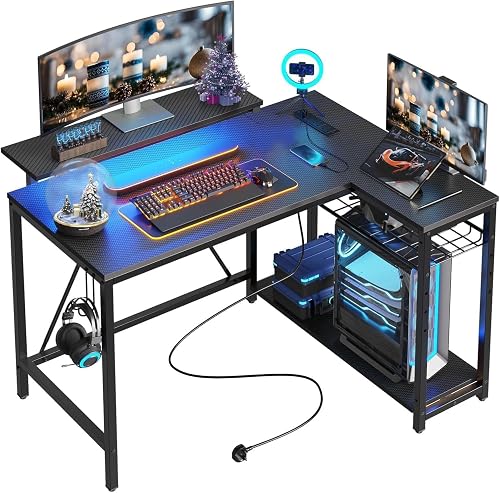
This is the most compact corner desk in the roundup, and the 42 inch footprint is the reason it works in a studio apartment where a 53 inch L simply will not turn the corner. The 4.6 average across more than 3,100 reviews backs up how much buyers like the density of features.
The upper shelf is the smart part. It works as a display shelf or as a monitor riser, and raising the screen puts it closer to eye level without buying a separate stand.
Two AC outlets, one USB and one Type-C port sit in the desktop, and the under-shelf RGB strip gives you light without a lamp taking up surface area. The headphone or backpack hook keeps the corner clear.
Plan for two people during assembly. Reviewers consistently say the shelves need careful alignment to sit flush, and at 32.6 pounds the parts are not easy to hold alone.
Buy it if your room is small but you want a full setup
Apartments, loft bedrooms and shared kids rooms get corner efficiency nobody else here offers at this width. The reversible shelves adapt to your layout.
Anyone working at night benefits from the strip, which is real task lighting rather than decoration.
Skip it if you are shorter than average
The 35.91 inch overall height includes the upper shelf, and shorter users report it reads as tall and imposing. A 29.5 inch fixed desk suits you better.
Storage is open shelves only, so loose stationery ends up visible.
11. Korfile 47 Inch Desk With Five Drawers – Best Drawer Storage

Five drawers is the most storage you will find on any desk in this roundup, and for anyone who has been using a plastic tower beside their computer it changes the whole setup. The 47 inch top leaves enough clear space for a monitor and keyboard once the drawers go underneath.
The drawer layout is configurable in several ways, so you can arrange the unit to leave room for a CPU tower or to open up the worktop. That flexibility is the real feature, more than the RGB strip.
The industrial powder-coated steel frame with crossbar support is rated to 200 pounds and reviewers say it does not wobble once every screw is properly tightened. The 22 lighting effects and the remote work as advertised, though the adhesive on the strip and the remote itself are the weakest parts.
It is not compatible with monitor arms, so plan your display on a stand or on the top surface. That also means you cannot clamp a heavy arm into the particle board and risk splitting it.
Buy it if you want to retire your storage tower
Home office users, students and family command centers get everything in one footprint. Five drawers hold cables, adapters, stationery and games consoles.
The configurable layout lets you swap the drawer position as your setup changes, which is rare at this tier.
Skip it if you want easy assembly
Reviewers call the assembly harder than it should be and say the instructions are vague in places. Two people and a full hour is a fairer estimate.
Over-tightened screws crack the particle board, which is the single most common cause of the complaints on this listing.
12. AODK 53 Inch L-Shaped Desk – Best For Dual Monitors

For two monitors in a corner, the 53 inch span here does the work. The main surface plus the return gives you room for two panels with a real gap between them, and the 4.6 rating across more than 2,300 reviews says most buyers agree.
The top hutch mounts on either side and the two-tier upper rack converts from a display shelf to a monitor stand. That flexibility means you can change the layout if you move rooms, which is a genuine advantage over a fixed corner unit.
Three power outlets and two USB charging ports are built into the desktop, and the LED strip runs ten static colors, eight brightness grades and ten dynamic modes with memory. A CPU stand, headphone hook and storage bag come in the box.
The most common complaint is wobble before assembly is finished. Tighten every screw firmly and re-check the frame after an hour of use, and the reviewers who do that report a stable desk.
Buy it if you run two monitors in a corner
Remote workers, streamers and students with a laptop and two screens get the surface area they need without moving to a 67 inch footprint.
The integrated charging cuts the extension strip out of the picture, which is a real improvement for cable management.
Skip it if you need drawers or deep space
There are no drawers at all here, storage is open shelves plus the included bag. Anyone with small loose items should look at the Korfile instead.
The 18.9 inch depth is shallow for a full-size tower, and the frame is heavier than simpler L-shaped desks.
13. SEDETA 67 Inch L-Shaped Battlestation Desk – Best Fully Loaded Setup
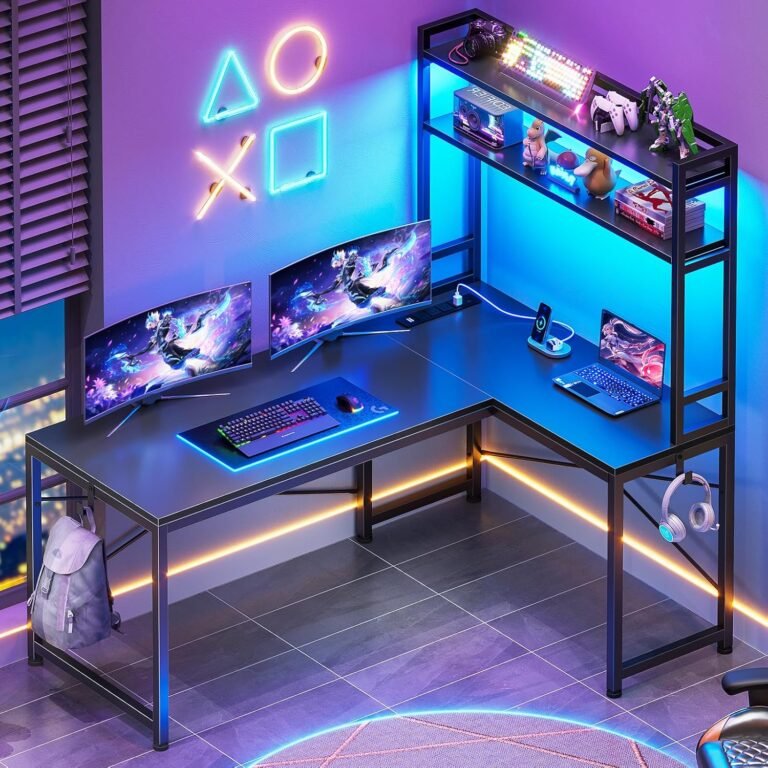
This is the only desk here that holds three monitors or two complete workstations, and it converts to a 94.5 inch two-person desk when you need it. At 4.7 stars it is the highest-rated product in the roundup, with roughly 1,300 reviews behind that.
The app-controlled RGB lighting with music sync is the feature reviewers single out first. Then they mention the keyboard tray, which frees a large amount of desk space that an L-shape otherwise wastes.
A pegboard, top hutch, two-tier shelves, CPU stand, headphone hook and storage bag are all included, and the charging station gives you four outlets and two USB ports with an on-off switch. The FSC-certified wood surfaces are a step up from raw particle board.
This is also the desk with the most room for error. At 76 pounds and 67 by 57 inches, you need a large room and a second person to assemble it, so measure twice before ordering.
Buy it if you are building a real battlestation
Streamers, editors and two people working in one room get a single surface that no other desk under the cap can match. Three monitors or two full rigs fit.
The keyboard tray and pegboard mean your peripherals stay organized instead of spreading across the return.
Skip it if your room is average sized
This is the desk people regret most often. A 67 by 57 inch footprint needs a dedicated room or a large corner, not a spare bedroom.
At 76 pounds it stays where you put it, so plan the final position before the box is opened.
14. ODK 53 Inch L-Shaped Desk Rated To 300 Lbs – Heavy-Duty Frame

The 300 lb weight rating is the highest published figure in this roundup, and the X-shaped alloy steel frame is what earns it. Owners with heavy multi-monitor setups single that frame out as the reason their desk has not shifted or flexed.
At 4.7 stars with close to a thousand reviews, this is a strong package for the money: a 53 inch surface, integrated power, cable channels and a reversible layout, all on a frame that does not need tightening every month.
Three AC outlets, two USB ports and dedicated cable management channels keep cords attached to the desk instead of trailing to the floor. The RGB strip runs ten colors, eight brightness grades and ten dynamic modes with memory.
The adjustable foot pads on the X-frame let you level it on carpet, which removes one of the most common sources of wobble. Tools and pre-labeled parts are included, and buyers praise the labeling.
Buy it if you have a heavy rig or a monitor arm
Gamers with a tower, dual monitors and mounted displays get the highest published capacity on this list. Heavy equipment is what this frame is designed for.
Anyone tired of cords on the floor gets real cable channels rather than adhesive clips.
Skip it if you need drawers or a light unit to move
Storage is open shelves only. Small loose items need a separate drawer unit or an organizer.
At 46 pounds it is difficult to reposition, and the particle board top should be kept away from water and heavy monitor mounts.
15. ChooChoo 39.4 Inch Farmhouse Writing Desk – Best Farmhouse Style

The farmhouse styling is why this desk is on the list, and it stands apart from a roundup otherwise full of black steel and carbon fiber finishes. Reviewers also repurchase it for a second room, which tells you how it wears.
Two wood-slide drawers hold papers, pens and office supplies, and 20 liters of storage volume sits behind them. The 39.4 inch surface fits a small nook and doubles as a sewing or makeup table.
Build time is about 60 minutes with numbered parts and an included assembly tool. That is the longest of the fixed desks here, so plan an evening rather than a coffee break.
The 49 lb weight recommendation is the number to read carefully. It excludes a monitor arm, a desktop tower or anything clamped down, and a few owners report smaller lock fittings loosening at the joints over time.
Buy it if appearance leads your decision
A bedroom, craft room or guest room gets a piece that looks like furniture rather than office equipment. Five finishes are available including natural oak and espresso.
If you sew, draw or do makeup at the same desk, the two deep drawers and the wide shallow top suit those tasks well.
Skip it if you plan heavy equipment on top
A 49 lb rating covers a monitor and a laptop. It does not cover a tower, a monitor arm or multiple panels.
The sharp tabletop corners and the fiddly joint fittings are the two complaints that come up most often, so check every screw during the build.
How to Choose a Desk Under Two Hundred Dollars
Every desk above clears the cap, but the differences that matter come down to four measurements: how much your setup weighs, how wide the surface needs to be, how deep it is, and how tall you are. Get those right and the choice is easy.
Step 1: Calculate your setup weight before you look at load ratings
Add up what will sit on the desk. A 27 inch monitor is roughly 12 to 15 pounds, a 32 inch one can run past 20, a desktop tower adds 25 to 40, a laptop is around 5, and a monitor arm plus a second panel can add another 15. Add the desktop weight itself, because the frame carries all of it.
Now double that figure and use it as your working target. Doubling gives you headroom for the kick you get when you sit down, and for the screws in the frame working a little loose after a year. A desk rated at 100 pounds carrying a 70 pound setup has no margin left.
Where a listing publishes no capacity at all, treat that as a soft warning rather than a dealbreaker. It usually means the load was never tested, which is common on small particle board desks.
Step 2: Measure the room and the wall before the desk
Desk width is the number people get wrong. Measure the wall or corner first, then subtract a few inches for the legs, a chair and whatever passes behind it. A 67 inch L-shape needs a real corner, and that is the single most common return reason in this category.
Depth is the second surprise. Almost every budget desk here is between 17 and 24 inches deep. Monitors sit at the back edge, which pushes the screen toward the wall. If you plan two 27 inch panels, aim for 24 inches of depth or more, and check that the desk depth plus the monitor distance clears your chair.
Step 3: Read the tabletop material honestly
Particle board and MDF are the standard at this price, and they are fine for light use. They chip at screw points, ring-mark under a mug, and can sag along the middle on a wide span without a crossbar underneath. The Huuger 55 inch desk is the case to watch, since width increases the chance of a center dip.
Solid wood, bamboo and FSC-certified veneers hold edges better and can be sanded or re-finished later. Only a few desks on this list use them, and when they do, the wood is usually a veneer over engineered board rather than a solid slab. That is still an upgrade on raw particle board.
One practical tip from buyer reviews: put a desk mat on any particle board top you use for writing. It protects the surface from pen marks and spills at almost no cost.
Step 4: Use the warranty and frame as the real quality signal
Across the budget desks on this list, warranty length is the most honest quality indicator available. The Veken’s two-year coverage is unusual in a category full of ninety-day and one-year terms, and experienced buyers on r/StandingDesk read warranty length as the manufacturer’s own admission of how long the electronics should last.
The second signal is the frame material. Steel tubes with cross bracing and adjustable feet beat a single central panel every time, which is why the PayLessHere desk feels solid despite being small. A desk with a stated weight rating is also telling you something a listing without one is not.
Standing desk notes: motors, presets and real height
Two electric desks sit under the cap, the ErGear and the Veken, and both are single-motor designs. Dual-motor frames divide the load across two lifting columns, which is why they cost more, but a single motor with a steel frame is workable as long as your setup is inside the published capacity.
Memory presets matter more than most listings suggest. Both electric desks here offer them, and they are the difference between standing up in two seconds and hunting for the right button combination every morning.
One trap to know about: published height ranges are usually measured with a desktop installed, so the actual frame sits a little lower than the number suggests. If you are over six foot two, add an inch or two to your expectations and check the maximum figure against your elbow height standing up. If you are under five foot four, look for a desk with a low minimum height rather than a high maximum.
Assembly, wobble and the fixes
Flat-pack desks in this range run from ten minutes to a full hour. Steel frame desks with labeled parts, like the PayLessHere, are at the fast end. Desks with many components and long drawer slides, like the ChooChoo and the SEDETA, take two people and an evening.
Most wobble complaints trace to three fixable things: unfloor-leveled feet, loose bolts, or a missing crossbar. Tighten every bolt to firm rather than hard, adjust the leg pads to your floor, and if a desk still rocks, a strip of foam tape under the short legs costs almost nothing and settles it permanently.
A monitor arm also changes the equation, because clamping one transfers load to the tabletop rather than the floor. Only choose a desk with a stated capacity or solid wood if you plan to mount displays, because particle board cracks around screw points over time.
Frequently Asked Questions
What is the best and most affordable computer desk?
The ErGear 48 x 24 inch electric standing desk is the best overall pick under two hundred dollars. It lifts from 28.35 to 46.46 inches, runs on an alloy steel frame with a stated 176 lb capacity, and holds more than 12,000 reviews averaging 4.5 stars. If you do not need height adjustment, the PayLessHere 32 inch steel frame desk is the cheaper and steadier option.
What is the best and most affordable computer table?
For writing rather than computing, the ChooChoo 39.4 inch farmhouse writing desk and the Furinno Econ desk both suit paper notebooks better than a metal-frame desk. The Furinno includes a pull-out keyboard tray and two open shelves, while the ChooChoo offers two deep wood-slide drawers and 20 liters of storage. Both suit bedrooms and craft rooms.
Where is the best place to buy computer desks?
Most buyers under this budget buy from Amazon, where the largest selection and the fastest returns live. Big-box electronics stores let you see the frame and finish in person before buying, and IKEA is the destination for a modular drawer-and-top build you can replace one piece at a time. Check the warranty terms wherever you buy, since that is the real quality signal.
Who makes the best computer desk?
No single brand wins every category. At this budget the strongest names are ErGear and Veken for electric standing desks, Huuger and ODK for L-shaped frames with built-in power, and PayLessHere for simple steel frame desks. What matters more than the label is the frame material, the stated load rating and the warranty length on that specific listing.
What is the best standing desk under this price cap?
The ErGear 48 x 24 inch electric standing desk is the best standing desk under this cap. It has a quiet single motor, four memory presets, an alloy steel frame and a published 176 lb capacity, and it sold alongside more than 12,000 reviews. The Veken 55 inch model is the alternative when you need more width and a two-year warranty.
Are cheap standing desks okay?
Yes, within limits. A cheap electric desk with a steel frame and a one or two year warranty can run for years, but the electronics are usually the first thing to fail, not the steel. Single-motor designs concentrate the load in one column, so keep your setup inside the published capacity, and expect the controller or motor to be the weak point rather than the frame.
What is the best standing desk for a budget?
The best budget standing desk is a frame with two lifting columns and memory presets, and few of those land under this cap. Among complete desks, the ErGear 48 x 24 model is the pick, with a 176 lb rating and four presets. If you build it yourself, a frame-only purchase with a separate top is the route experienced buyers take to reach dual-motor quality.
Are standing desks worth the money?
They are worth it if you change position through the day, and less so if you sit in one spot for eight hours. The health benefit comes from varying posture, not from standing all day, so a cheaper desk with a keyboard tray or a fixed steel frame may serve you better if you never change height.
Conclusion: The Best Computer Desks Under 200 Dollars By Setup
The best computer desks under 200 dollars are not one desk, they are four answers to four situations. For most people, the ErGear 48 x 24 electric standing desk is the right buy because the steel frame holds a real setup and the motor works every day.
For a dorm or a small bedroom, the PayLessHere 32 inch steel frame desk is steadier and cheaper to live with, and the DLisiting adds drawers if storage is the gap. For a corner, the Bestier 42 inch L-shape fits small apartments and the AODK 53 inch model handles dual monitors.
Whichever one you pick, do the load math first, check the warranty length, and level the feet before you start. Those three steps decide whether a budget desk still feels good in year three.

Related Articles